
Dashboard & the Case Pack
The dashboard
HR → Discipline → Discipline Dashboard. Its layout is an opinion: what needs a human first, quality second, counts last — because "how well are we running the process" matters more than "how many cases do we have".
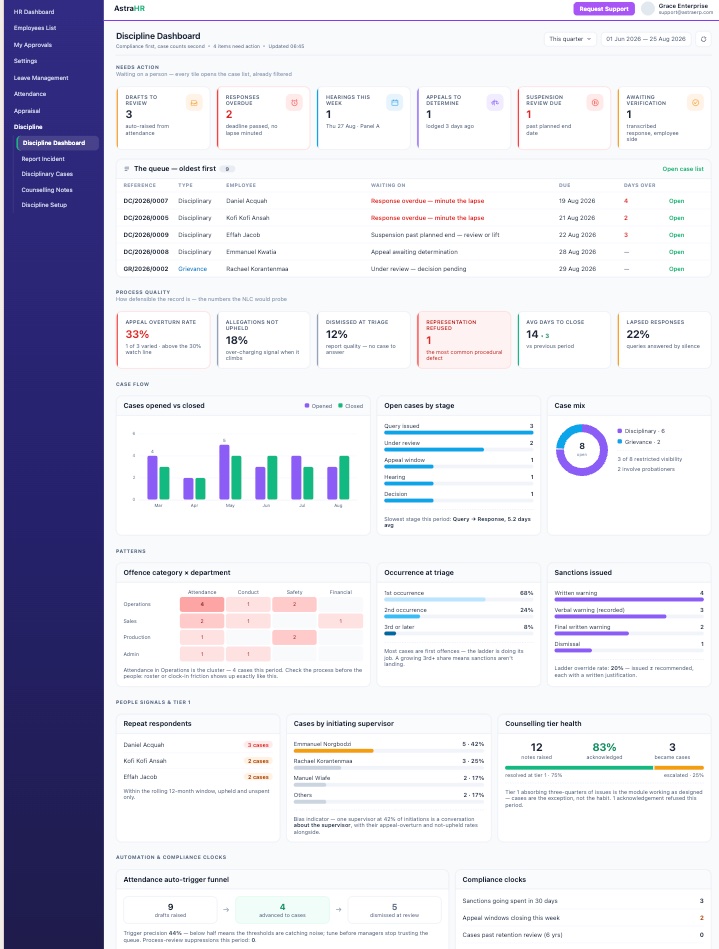
Two kinds of number live on the page, and the header of each section says which is which:
- Current state — Needs Action, the work queue, open-by-stage, the case mix and the compliance clocks describe the caseload as it stands and ignore the period filter.
- Period bound — everything else follows the From/To range in the header (default: this quarter; quick periods reload immediately).
| Section | What it tells you |
|---|---|
| Needs Action | Six tiles for what is waiting on a person: drafts to review, responses overdue (no lapse minuted), hearings in the next 7 days, appeals awaiting determination, suspensions past their planned end, transcribed responses awaiting employee verification. Every tile opens the case list already filtered, and the queue below lists the same items oldest-first with days overdue |
| Process Quality | The numbers the NLC would probe: appeal overturn rate (flagged above 30% — retrain the issuers, don't blame the appellants), allegations not upheld (over-charging signal), dismissed at triage (report quality), representation refused (the most common procedural defect — red the moment it is non-zero), average days to close with the trend against the previous period, and lapsed responses |
| Case Flow | Cases opened vs closed per month (are you keeping up?), open cases by stage with the slowest stage computed from the audit trail, and the disciplinary/grievance mix with the restricted-visibility count |
| Patterns | The offence category × department heatmap — a cluster is usually a process problem (roster friction, unclear rules) before it is a people problem; occurrence at triage (is the ladder deterring repeats?); sanctions issued with the ladder override rate |
| People Signals & Tier 1 | Repeat respondents over a rolling 12 months (dismissed cases excluded); cases by initiating supervisor — the bias indicator: one supervisor generating a disproportionate share is worth a conversation about the supervisor, read with their overturn and not-upheld rates; and counselling-tier health — notes raised, acknowledgement rate, and how many became cases |
| Automation & Clocks | The attendance auto-trigger funnel (raised → advanced → dismissed) with a trigger precision figure — below half means the thresholds are catching noise; and the compliance clocks: sanctions going spent within 30 days, appeal windows closing this week, undisclosed evidence on decided cases |
The case pack
The Case Pack button on any case produces the complete NLC-ready bundle as one ordered, printable document on your company letterhead (uploaded under Config → Letterhead). Use the browser's Print → Save as PDF for the file.
Contents, in order:
- Cover — reference, parties, offence, class, dates, status, occurrence
- Allegations & findings — each assertion with its adjudication and rationale
- Evidence index — every item with collector, timestamp and disclosure proof (undisclosed items flagged red)
- The query as served — the exact text, deadline, the employee's opened timestamp, any minuted lapse
- The employee's response — verbatim, with mode and verification status
- Investigation — investigator, terms of reference, findings, witnesses
- Hearing — panel, notice, attendance register, representation status (requested-but-refused in red), minutes, votes with dissents
- Sanction — what, when, by whom, any override justification, the letter as served, acknowledgement or recorded refusal
- Appeal — lodgement, grounds, submission, determination and rationale
- Chronology — the full append-only audit trail, actor and timestamp on every line
Nothing in the pack is composed for the occasion — every line is the record as it was written at the time. That is exactly what makes it persuasive.