
Setup & Configuration
Everything the module judges cases by lives in one place: HR → Discipline → Discipline Setup — a tabbed workspace. This page walks every tab, in the order you should review them.
You start from a working catalogue
A complete Ghana SME default catalogue is seeded automatically for every company (and can be re-run any time from the Seed Catalogue tab). Your job on day one is to review and adjust, not to build from scratch.
The two configuration laws
- Deactivate, never delete. Configuration referenced by a case must stay resolvable forever, so every list offers Deactivate (the ban icon), never delete. Deactivated rows show greyed and stop appearing on new cases; historical cases still resolve them.
- Effective dating. Offences, sanction types and authority rules carry Effective from / to. A case runs under the configuration in force on its incident date. When you change policy, set the new row's effective date rather than rewriting history.
Tab 1 — Parameters
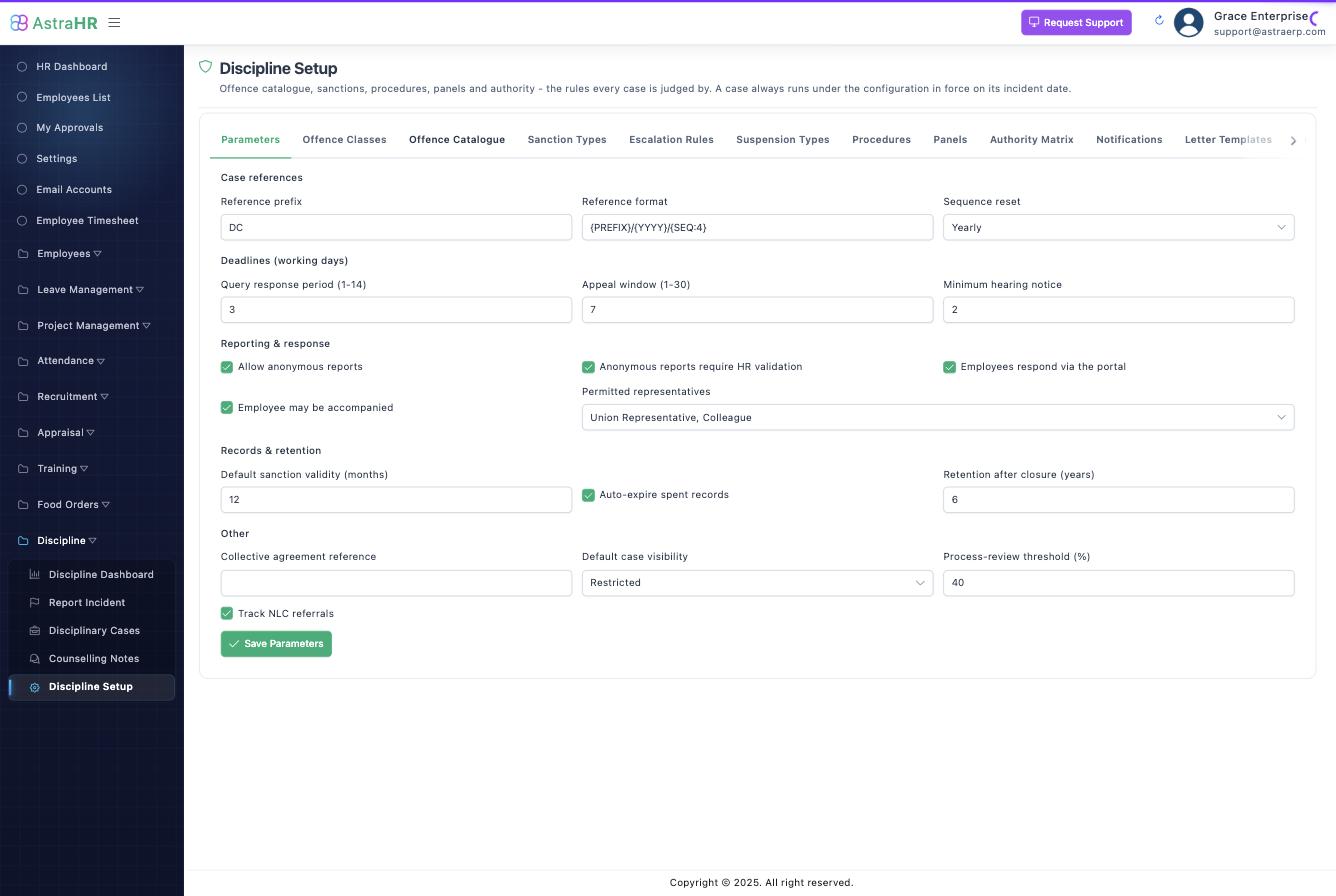
One record per company; the module-wide defaults.
| Setting | Meaning | Default |
|---|---|---|
| Reference prefix / format / reset | How case numbers are minted, e.g. {PREFIX}/{YYYY}/{SEQ:4} → DC/2026/0007; sequence resets never/yearly/monthly | DC, yearly |
| Query response period | Working days the employee has to answer a query (1–14) | 3 |
| Appeal window | Working days to appeal a sanction (1–30) | 7 |
| Minimum hearing notice | A hearing cannot be scheduled inside this many days | 2 |
| Anonymous reports / HR validation | Allow anonymous intake; require a named HR validator before an anonymous report passes triage | on / on |
| Employees respond via the portal | The query/response step runs through ESS | on |
| Representation | Whether and by whom the employee may be accompanied (union rep, colleague, lawyer, family) | on; union rep + colleague |
| Default sanction validity | Months before a sanction becomes spent when its type doesn't specify | 12 |
| Auto-expire spent records | Drives the nightly expiry job | on |
| Retention after closure | Years, for Act 843 alignment | 6 |
| Default case visibility | Restricted / Department / HR only | Restricted |
| Process-review threshold | Above this % of staff breaching, auto-triggers stand down and flag HR instead | 40% |
Working days everywhere: all deadlines skip weekends and the public-holiday calendar maintained in HR.
Tab 2 — Offence Classes
The severity bands: Minor, Major, Gross Misconduct (seeded; you may add). Each class sets: severity rank, whether an investigation and a hearing are mandatory, whether it permits summary dismissal, and its default procedure.
The one rule you cannot configure away
Permits summary dismissal requires Hearing mandatory. There is no configuration in which an employee can be dismissed without a hearing — the save is refused.
Tab 3 — Offence Catalogue
What an employee can be charged with. Each offence has three tabs in its editor:
Details — code (ATT-01), name, class, category, and the definition. The definition is printed verbatim on the query letter — write it as it should read to the employee, not as legal shorthand. Optional: handbook clause, statutory reference (e.g. Act 651 s.62), CBA clause, "requires investigation" (may only raise the class default), "prompt precautionary suspension", "externally reportable", restricted visibility (harassment/financial — excludes the line manager from the case), record validity override, grade/department applicability, effective dates.
Sanction Ladder — one row per occurrence: the recommended sanction for the 1st, 2nd, 3rd… upheld occurrence, optional floor/ceiling for overrides, and whether overriding needs a justification (default yes). Occurrences must run 1, 2, 3… and severity may never decrease down the ladder — the save tells you if it does.
Evidence — the expected evidence types (rendered as a checklist on the case), whether evidence is mandatory before the query can be issued, and guidance for the investigator.
Tab 4 — Sanction Types
The penalties a case can impose. Seeded set: Verbal Warning (Recorded), Written Warning, Final Written Warning, Suspension Without Pay, Dismissal With Notice, Summary Dismissal.
Key fields: severity rank (unique — drives ladders and appeal routing), kind (warning / financial / status change / separation / non-punitive), terminal (ends employment), validity months (empty = permanent), appealable + window override, letter template, and the payroll block — effect (none / unpaid period / fixed / percentage deduction / increment withheld / grade change), the payroll item it applies through, deduction cap, duration limits. Terminal sanctions must state their notice treatment (served / pay in lieu / summary) and separation reason.
Hard validations: terminal ⇒ hearing required, no validity, notice treatment set; a payroll effect needs its payroll item.
Tab 5 — Escalation Rules
Progressive discipline across offences: "3 attendance offences in 12 months → Final Written Warning". Rules run in priority order; the first match wins, and the result is a recommendation shown at triage — never auto-applied. Scope: same offence / same category / same class / any offence; rolling lookback window; counting flags (upheld only — default on; include expired — default off; count counselling notes — the tier-1→2 bridge).
Tab 6 — Suspension Types
Precautionary suspension is configured here — it is not a sanction type. Pay treatment (full/half/no pay), maximum days (review prompt at expiry), extensions and approver, whether it revokes portal access, recalls assets, or pauses attendance capture (so no absence penalties accrue while suspended). Auto-lift on case closure is always on and cannot be disabled.
Tab 7 — Procedures
The ordered steps a case follows: Triage → Investigation → Query → Response → Hearing → Decision → Sanction → Appeal → Closure — each step with mandatory flag, responsible role, SLA (working days) and optional document. Templates apply per class, per grade, per employment type — and probationers must have their own template; the system never silently applies the permanent-staff ladder to them.
Validation: a template for a hearing-mandatory class must contain a mandatory Hearing step preceded by a Query step.
Tab 8 — Panels
Hearing panels: members with roles (exactly one Chair), voting flags, alternates; quorum; decision rule (unanimous / simple majority / chair decides). The conflict-of-interest switches live here — but two are locked and always on: the complainant and the investigator can never sit. Optional: exclude the respondent's direct supervisor (default on), same department, declared relations; manual recusal (reason minuted).
A one-member panel is legitimate — the "minimum viable hearing" for a small company is a single hearing officer with the conflict rules still enforced.
Tab 9 — Authority Matrix
Per sanction (and optionally per grade/department scope): who may issue, who must approve (second signature), who hears the appeal (role and/or panel), and any final authority. The appeal authority must sit strictly above the issuing role in the seniority order — the matrix refuses a configuration where the issuer would hear the appeal against their own decision.
Roles are assigned to employees under HR's management-role assignment; the order is: Line Manager < Department Head < HR Officer < HR Manager < Managing Director < CEO.
Tab 10 — Notifications
One rule per event × recipient: which events (query issued, hearing scheduled, sanction issued, response overdue, appeal lodged/decided, case closed…) notify whom (respondent, complainant, line manager, HR, a custom role) on which channels. Suppress on restricted cases (default on) keeps harassment matters from leaking through a cc line. Email is the delivery channel today; in-app and SMS ride the same matrix when wired.
Tab 11 — Letter Templates
The letters the module serves: query, hearing invitation, warning, sanction, dismissal, suspension, appeal letters. Bodies are plain text with merge tokens — {employee.full_name}, {case.reference}, {offence.name}, {offence.description}, {query.response_deadline}, {sanction.name}, {appeal.deadline} and more. Letters and the case pack render on the company letterhead uploaded under Config → Letterhead.
Locked wording
The hearing invitation's right-to-be-accompanied sentence is appended by the system at render time and is not editable template text — no tenant can forget it.
Tab 12 — Seed Catalogue
Shows how many records each catalogue currently holds, and Run Seeding loads whatever is missing from the Ghana SME default set. Safe at any time: every record is checked by its code first, so seeding only fills gaps — it never duplicates and never overwrites your edits. The result panel shows exactly what each run added.